ClawBox 3.0 is not just another update. It is the release where ClawBox becomes a complete AI computer: a browser-based operating system, encrypted device backups, secure remote access, and a much more capable ClawBox AI experience built around frontier models.
If v2 made ClawBox usable from a browser, v3 makes it feel like a product you can rely on every day.
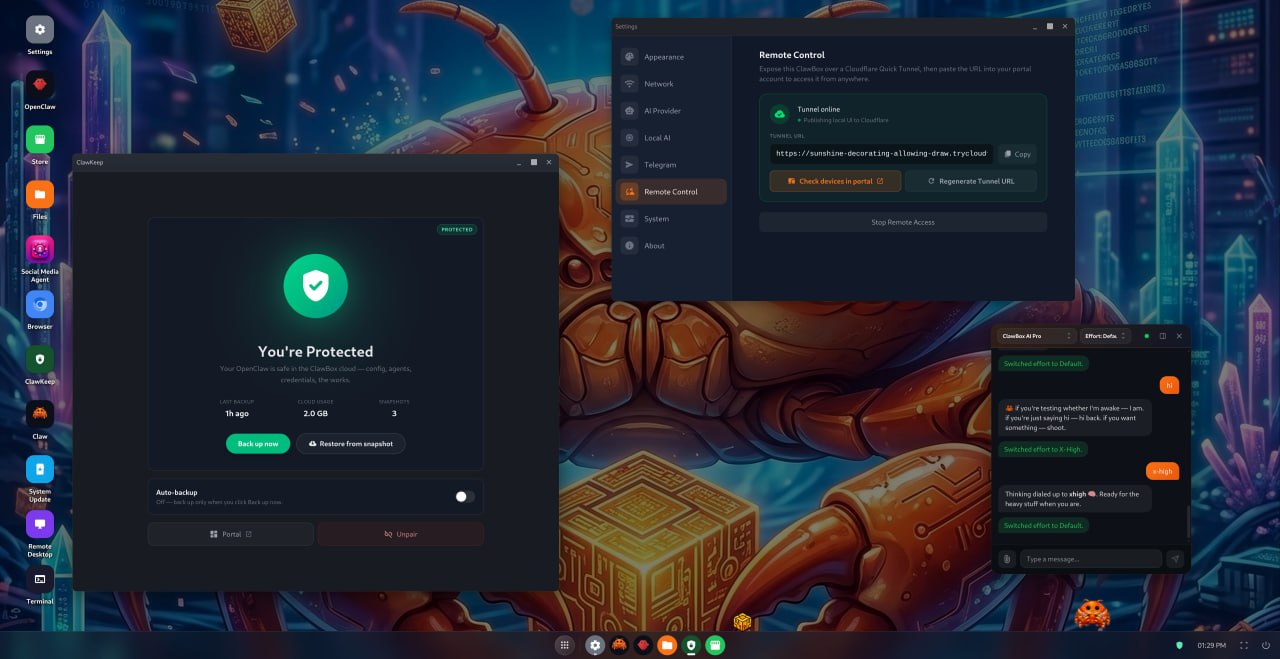
ClawBox OS: Your AI Workstation in the Browser
ClawBox OS is the control surface for the whole device. Open ClawBox from a laptop, tablet, or phone and you get a real desktop environment in your browser — apps, windows, settings, chat, backup, remote access, and system tools in one place.
In ClawBox 3.0 we focused on making that OS feel faster, safer, and more predictable:
- A smoother setup wizard that walks users through the full device configuration instead of relying on API-driven happy paths.
- Gateway-aware onboarding, so setup can run even while the gateway is still bootstrapping.
- Desktop polish, including better icon layout, built-in apps that behave like system apps, queue scrolling, mobile bar improvements, and instant chat after refresh.
- Visible agent activity, with tool-call indicators so you can see when the assistant is working with files, browsers, settings, or other tools.
- Chat input queueing, so you can keep typing while a turn is still running — messages drain cleanly one at a time.
- Model switching that actually sticks to the active session, with clear confirmation instead of silent state drift.
The goal is simple: ClawBox should not feel like a Linux box you have to administer. It should feel like your own AI workstation.
ClawKeep: Encrypted Backups for Your AI Life
Your AI assistant becomes valuable because of its state: conversations, settings, installed apps, skills, code projects, automations, and local configuration. Losing that state is painful.
That is why ClawBox 3.0 introduces ClawKeep, encrypted device backup for ClawBox.
ClawKeep creates restic-backed snapshots of the important parts of your device:
- Chat history and assistant state
- Configuration files and settings
- Installed apps and skills
- Code projects and workspace files
- Device state needed to recover after a reset or re-flash
The important part: encryption happens client-side. Your backup is unreadable without the device passphrase. ClawKeep is designed for the exact moments that normally hurt — factory reset, SSD replacement, corrupted setup, or a full device re-flash.
In the ClawBox OS dashboard you can see when your device was last backed up, how much data is protected, and how many snapshots are available. One click backs up the device. One click starts a restore.
For a personal AI computer, backup is not a nice-to-have. It is the safety net that lets you experiment.
ClawBox AI: Frontier Models, Cleaner Setup, Better Control
ClawBox AI also gets a major upgrade in v3.
The new provider flow is built around DeepSeek V4 1M-context frontier weights as the default cloud model path, with plan-aware access through the OpenClaw portal:
- Pro uses the fast Flash path.
- Max unlocks the V4 Pro frontier path.
- The device automatically resolves the right tier from the portal.
- Free-tier users get honest gates and upgrade CTAs instead of confusing broken states.
We also made the chat experience smarter:
- Reasoning-aware controls show the right effort options for each provider instead of one generic dropdown everywhere.
- Curated provider model pickers let users select models for Anthropic, OpenAI, Google, OpenRouter, and ClawBox AI without typing long provider slugs.
- ClawBox AI is consolidated into one clean provider entry, with Flash/Pro selected from the model dropdown.
- Account-tier independence in v3.0.1 means paid ClawKeep and Remote Desktop access no longer flicker when you switch chat providers. A Max user chatting through OpenAI still keeps Max account features unlocked.
- Instant model picker loading now uses a disk-backed catalog cache, so the picker opens quickly after warmup instead of stalling on Jetson hardware.
This is the pattern we want for ClawBox AI: simple enough for normal users, powerful enough for people who care about models, context, reasoning, and provider choice.
Remote Control: Reach Your ClawBox Anywhere
ClawBox 3.0 adds secure remote control powered by Cloudflare Quick Tunnel.
That means you can access your ClawBox from outside your home or office without opening router ports, setting up dynamic DNS, or managing extra credentials. Remote access can start automatically at boot, remembers your Start/Stop intent across reboots, and routes through the same gateway authentication model.
For customers using ClawBox as a real assistant, this matters a lot. Your AI workstation should be available when you travel, when you are at work, and when your device is sitting quietly at home doing background tasks.
Reliability and Security Improvements
A big part of v3 is invisible — the kind of work you only notice because things stop breaking.
We hardened the device across setup, networking, security, update paths, and factory reset:
- Random per-device gateway auth tokens for stronger default security.
- Telegram bot DMs are no longer open to everyone by default after migration.
- Reliable factory reset, with the gateway masked during wipe and loud failures on partial reset.
- Faster gateway pre-start, replacing multiple config commands with a single read-modify-write path and saving roughly 70 seconds per restart.
- LAN origin allowlist fixes, so Windows clients using the device IP are not incorrectly rejected.
- mDNS / Avahi hardening, improving
<hostname>.localresolution on Windows. - Updater improvements, including skipping reinstall when OpenClaw is already current and better recovery for failed update steps.
- Persistent browser automation profile, while removing unnecessary
--no-sandboxusage. - VNC redeployed on update paths, keeping remote desktop reliable after upgrades.
These are the changes that make ClawBox feel less like a dev kit and more like a dependable appliance.
Local AI and Provider Switching
Local AI also received practical polish:
- Switching from Ollama to a cloud provider now resets model mode correctly.
- The local-only mode toggle shows a spinner while changes are in flight.
- The chat model dropdown respects local-only mode.
- The Gemma configuration state no longer flickers after standby.
- Safer inline controls prevent accidental model downgrades.
ClawBox is designed to support both local and cloud AI. v3 makes that hybrid approach less confusing.
What v3.0.1 Fixed After Launch
The v3.0.1 patch tightened the new chat and account model after real-world testing:
- Paid account features no longer depend on which chat provider is currently active.
- The model catalog is cached on disk for fast picker loading.
- Reasoning effort controls now match each upstream provider.
- The chat header has a cleaner compact dropdown design.
- The Settings user-name field no longer races the background preference poll.
Small patch, big quality-of-life improvement.
Why This Release Matters
ClawBox 3.0 is the release where the product becomes much more than “hardware that runs OpenClaw”. It is now a complete personal AI platform:
- ClawBox OS gives you a full browser-based desktop for managing the device.
- ClawKeep protects the state that makes your AI assistant personal.
- ClawBox AI gives you a simpler path to frontier models with plan-aware controls.
- Remote Control makes the box useful even when you are away from it.
- Reliability work makes setup, updates, reset, networking, and daily use more trustworthy.
This is the foundation for the next stage of ClawBox: a private, always-on AI computer that can run at home or in the office, keep its own memory, recover safely, and stay available wherever you are.
If you already have a ClawBox, update to the latest version. If you are new to ClawBox, v3.0 is the version that shows where this platform is going.