ClawBox Review: Is It Worth €549?
Honest Pros, Cons & Real User Experience — 2026
We put ClawBox through its paces — from unboxing to daily use. Here's our honest take on the dedicated AI assistant hardware powered by NVIDIA Jetson Orin Nano.
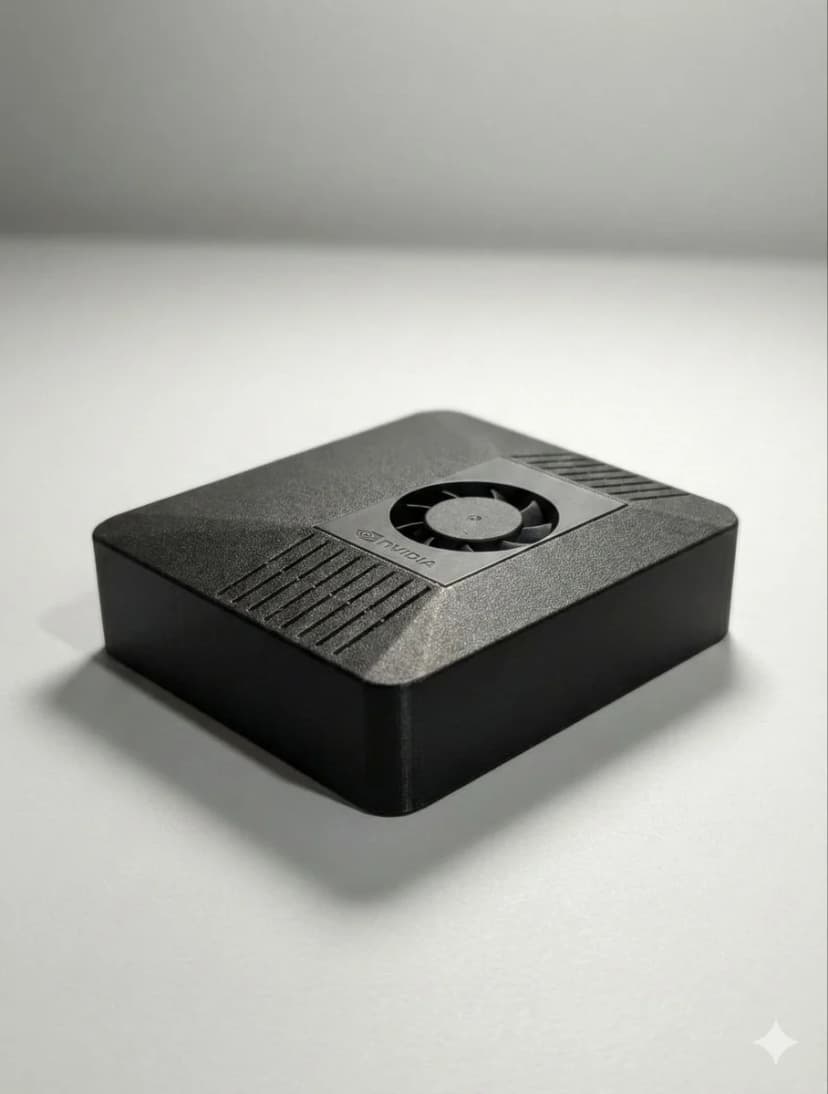
What is ClawBox?
ClawBox is a purpose-built AI assistant device made by OpenClaw Hardware. It's a compact, fanless box powered by the NVIDIA Jetson Orin Nano 8GB with OpenClaw pre-installed — the source-available AI assistant platform that connects to Telegram, WhatsApp, Discord, and more.
Think of it as a dedicated mini-server for your personal AI. It runs 24/7 on just 15 watts, handles browser automation, proactive scheduling, and multi-platform messaging — all without sending your data to the cloud.
At €549, it's positioned as the plug-and-play alternative to building your own Jetson setup or repurposing a Mac Mini. But is it worth the price? Let's dive in.
ClawBox Specifications
| Spec | Details |
|---|---|
| Processor | NVIDIA Jetson Orin Nano |
| AI Performance | 67 TOPS (INT8) |
| GPU | 1024 CUDA cores + 32 Tensor cores |
| RAM | 8GB LPDDR5 |
| Storage | 512GB NVMe SSD |
| Power Draw | 7–15W typical |
| Software | OpenClaw pre-installed & configured |
| Connectivity | WiFi, Ethernet, USB 3.0, HDMI |
| Form Factor | Compact fanless enclosure |
| Warranty | 30-day warranty + money-back guarantee |
✅ What We Like
100% Local & Private
Your data never leaves the device. No cloud subscriptions, no data harvesting. Perfect for privacy-conscious users who want AI without the surveillance.
Always-On at 15W
ClawBox sips power like a phone charger. Leave it running 24/7 for about €15/year in electricity. It's always ready — no boot-up waits, no spinning up VMs.
5-Minute Setup
Plug in, connect WiFi, scan a QR code. That's it. OpenClaw is pre-configured with all integrations. No Linux terminal wizardry required.
Browser Automation Built-In
ClawBox can browse the web for you — check prices, fill forms, monitor pages. This alone justifies the hardware for many power users.
Multi-Platform Messaging
One AI assistant across Telegram, WhatsApp, Discord, and more. Send it a message from any platform and get intelligent responses backed by your configured AI models.
67 TOPS AI Performance
The NVIDIA Jetson Orin Nano delivers real AI horsepower — enough for local inference, voice processing, and running smaller language models natively.
⚠️ What Could Be Better
8GB RAM Limits Large Local Models
While 8GB is fine for 7B parameter models and smaller, you won't be running 70B models locally. For the biggest open-source LLMs, you'll still want to pair ClawBox with a cloud API (OpenAI, Anthropic, etc.). The hybrid approach works, but pure offline enthusiasts may find this limiting.
Best Models Still Need Cloud API Keys
ClawBox runs smaller models locally, but for GPT-5 or Claude-level intelligence, you need API keys. This isn't a ClawBox limitation per se — no edge device can run frontier models locally yet — but it's worth noting that 'fully local' has practical boundaries.
Premium Price vs DIY
At €549, ClawBox costs more than buying a bare Jetson Orin Nano (~€250) and setting it up yourself. You're paying for the pre-configuration, enclosure, 512GB SSD, support, and the 'it just works' factor. If you enjoy Linux tinkering, DIY can save money. If your time is worth something, ClawBox saves hours.
Who Is ClawBox For?
Privacy-Conscious Users
If you've ever hesitated before typing something into ChatGPT, ClawBox is for you. Everything stays on your hardware, on your network.
OpenClaw Enthusiasts
Already using OpenClaw on a VPS or laptop? ClawBox gives it a permanent, dedicated home. No more competing with your other tasks for resources.
Non-Technical Users
Want a personal AI assistant without learning Docker, Linux, and networking? ClawBox's 5-minute setup means anyone can get started — no terminal required.
ClawBox vs Alternatives
| 🦞 ClawBox | Mac Mini M4 | RPi 5 | Cloud VPS | DIY Jetson | |
|---|---|---|---|---|---|
| Price | €549 | €699+ | €100–150 | €20+/mo | €300–400 |
| AI TOPS | 67 TOPS | 38 TOPS | 13 TOPS | Varies | 67 TOPS |
| Power Draw | 7–15W | 40–65W | 5–12W | N/A | 7–15W |
| Setup Time | 5 min | Hours | Hours | 30+ min | 10+ hours |
| OpenClaw Pre-installed | ✅ Yes | ❌ No | ❌ No | ❌ No | ❌ No |
| Privacy (Local) | ✅ 100% | ✅ Possible | ✅ Possible | ❌ Cloud | ✅ Possible |
| Support | ✅ Included | ❌ DIY | ❌ DIY | ❌ DIY | ❌ DIY |
| Always-On Ready | ✅ Built for it | ⚠️ Not ideal | ⚠️ SD card risk | ✅ Yes | ⚠️ DIY config |
ClawBox wins on convenience and purpose-built design. DIY saves money if you have the skills and time.
Real User Feedback
"Set it up in under 5 minutes. My Telegram bot was running before I finished my coffee."
— Early adopter
"Finally, an AI assistant that doesn't send my data to Big Tech. Worth every cent."
— Privacy advocate
"The browser automation alone saves me hours per week. ClawBox just sits there and works."
— Power user
More reviews coming as ClawBox ships to early customers in Q2 2026.
The Verdict
4.5 / 5 — Recommended
ClawBox delivers exactly what it promises: a dedicated, always-on, private AI assistant that anyone can set up in minutes. The NVIDIA Jetson Orin Nano provides genuine AI horsepower, and OpenClaw's multi-platform integration makes it immediately useful.
The 8GB RAM is the main compromise — you'll want cloud API keys for frontier-model intelligence. But for local inference, browser automation, proactive scheduling, and privacy-first AI? ClawBox is the best plug-and-play option on the market today.
If you want a dedicated AI assistant without the DIY headaches, ClawBox at €549 is an easy recommendation.
ClawBox Review FAQ
Is ClawBox worth buying in 2026?▾
What are the pros and cons of ClawBox?▾
How does ClawBox compare to Mac Mini for AI?▾
Can ClawBox run ChatGPT locally?▾
How long does ClawBox setup take?▾
Bereit zum Wechseln?
Schluss mit Vergleichen, fangen Sie an zu bauen. ClawBox ist Plug-and-Play KI-Hardware — in 5 Minuten einsatzbereit.
✓ Sichere Zahlung über Stripe