ClawBox v2.2.3 Beta is the biggest update we've shipped since the original launch. It turns ClawBox from a headless AI box into a complete AI workstation — with its own operating system, app store, and free AI provider built right in.
Here's everything that's new.
Full Web OS
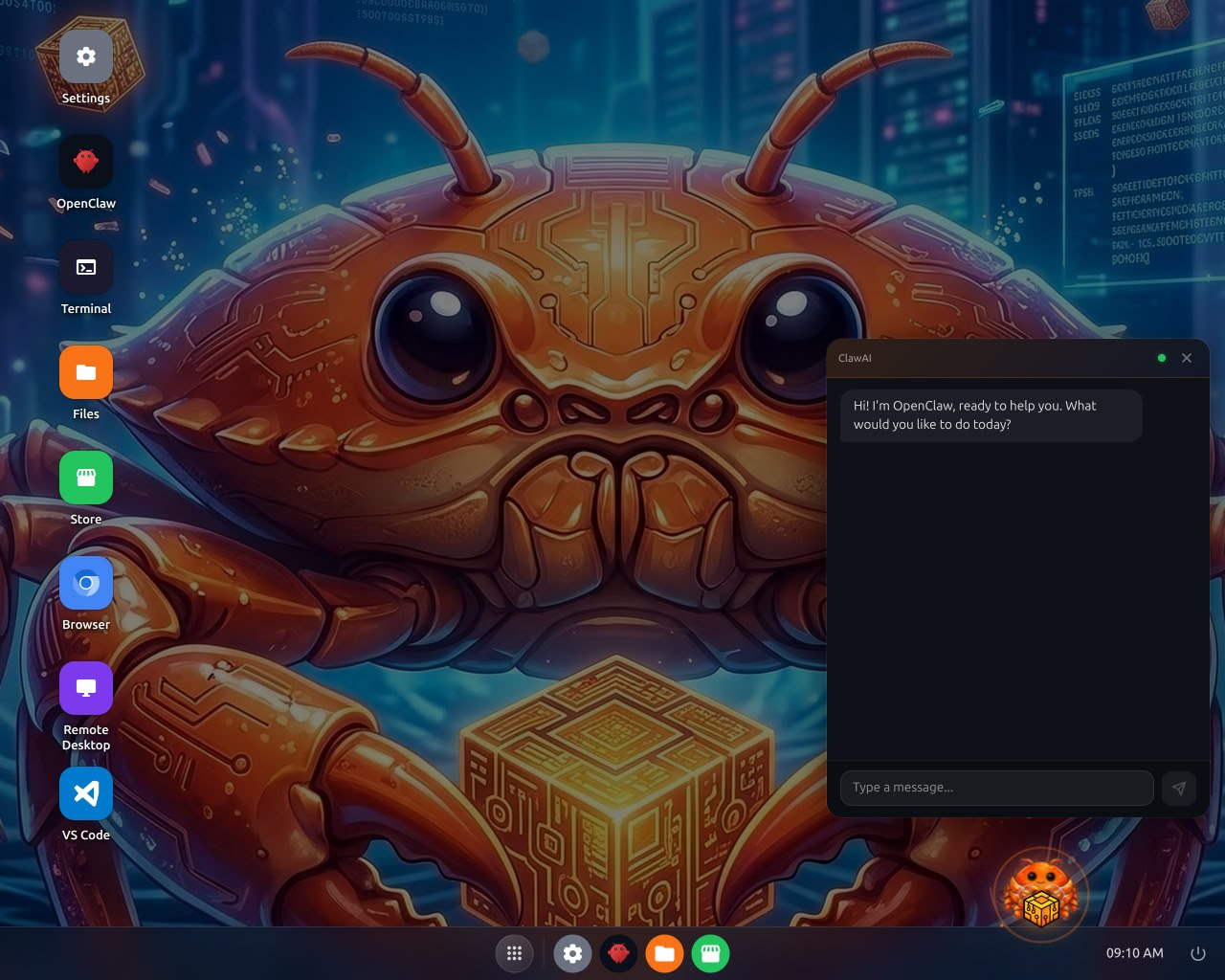
Open your browser, type in your ClawBox IP, and you're looking at a full desktop environment. Not a settings panel. Not a dashboard. An actual OS with:
- Desktop with app icons — Settings, OpenClaw, Terminal, Files, Store, Browser, Remote Desktop, VS Code
- Taskbar and system tray — just like a real desktop
- Window management — drag, resize, minimize, maximize
- Built-in ClawAI chat — always one click away in the corner
Everything you used to do via SSH or config files, you can now do from any browser on your network. Your phone, your tablet, your laptop — just open the URL and you're in.
No terminal knowledge required. No config files to edit. Just point, click, and go.
App Store
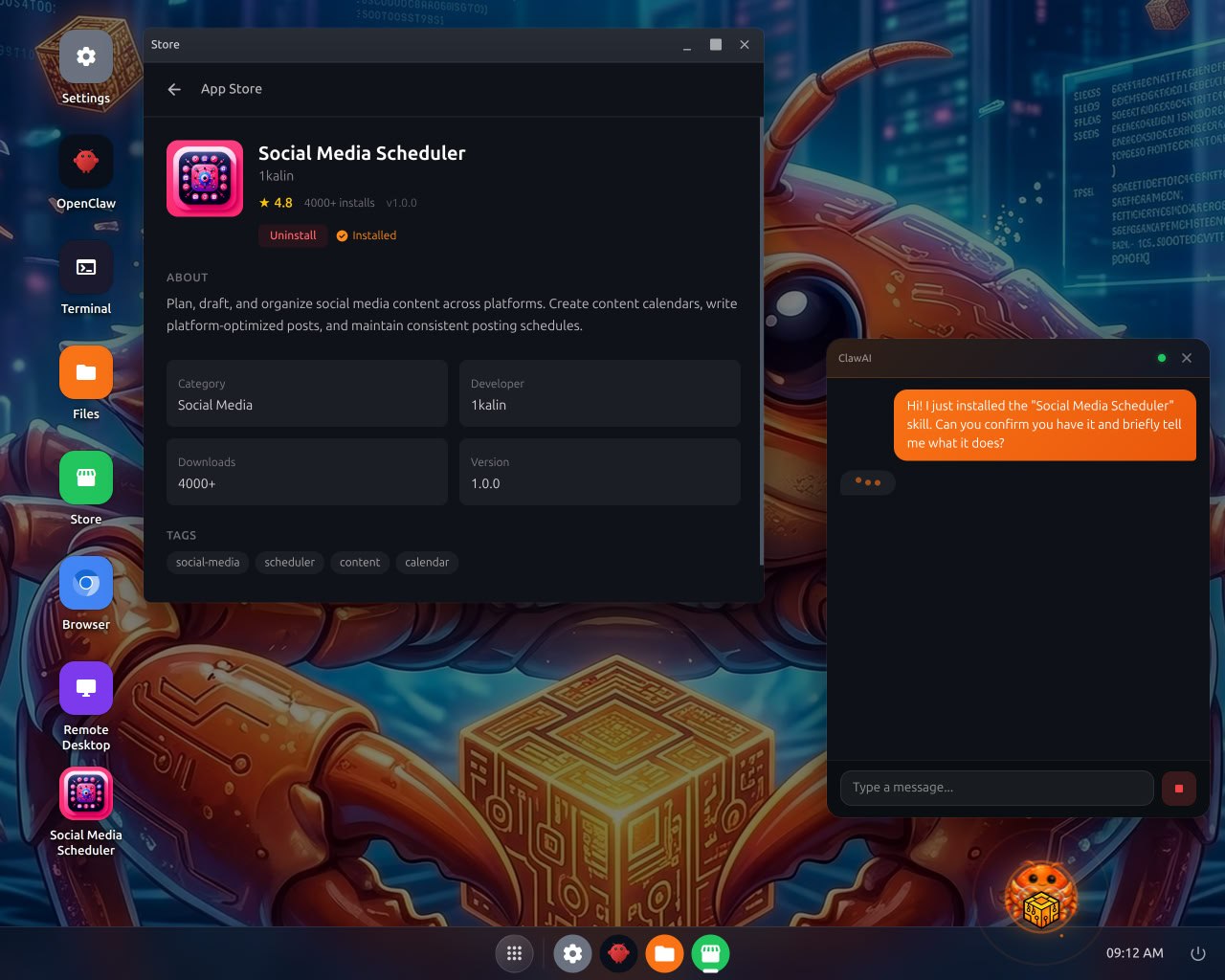
The ClawBox Store is where AI skills live. Browse, install, and manage automations without touching the command line.
Each skill shows:
- Ratings and downloads — community-vetted quality
- One-click install — click "Install", it handles the rest
- Categories and tags — find what you need fast
- Developer info — know who built it
We're launching with skills across categories like social media, productivity, home automation, and development tools. Community developers can publish their own skills to the store.
Install a Social Media Scheduler. Add a PDF analyzer. Set up home automation. All from a visual store, all running locally on your hardware.
ClawAI — Free AI Provider
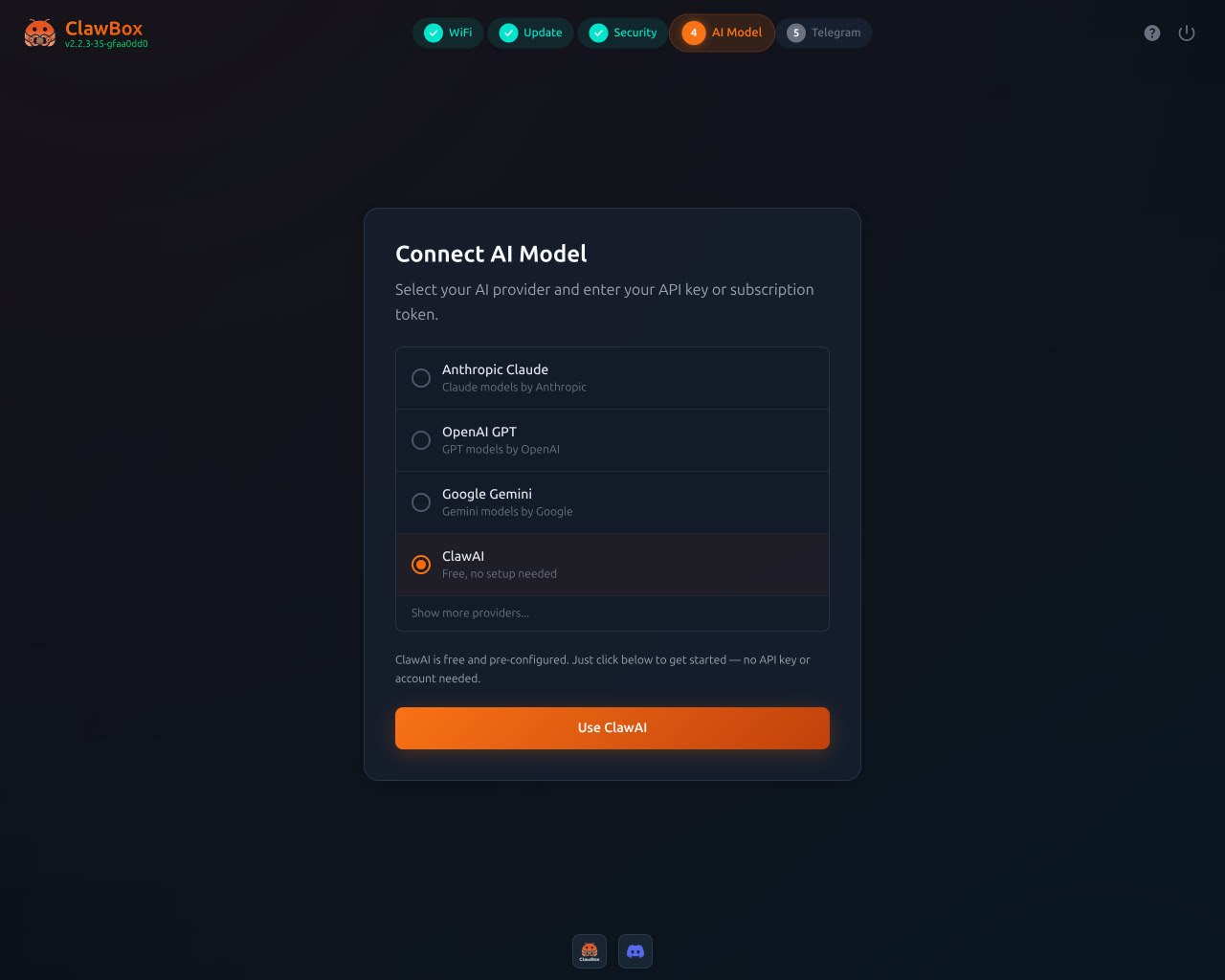
This is the one people have been asking about. ClawBox now ships with ClawAI — a free, pre-configured AI provider. No API keys. No accounts. No setup.
During the setup wizard, you'll see four options:
- Anthropic Claude
- OpenAI GPT
- Google Gemini
- ClawAI — Free, no setup needed
Select ClawAI, hit "Use ClawAI", and you're running AI immediately. No credit card. No subscription. Just your ClawBox doing what it was built to do.
Limits may apply — we're rolling this out gradually. But the goal is clear: you bought the hardware, you should be able to use AI out of the box.
Want more power or specific models? You can always connect your own API keys from Anthropic, OpenAI, or Google. ClawAI is the starting point, not the ceiling.
Improved Setup Wizard (10 Languages)
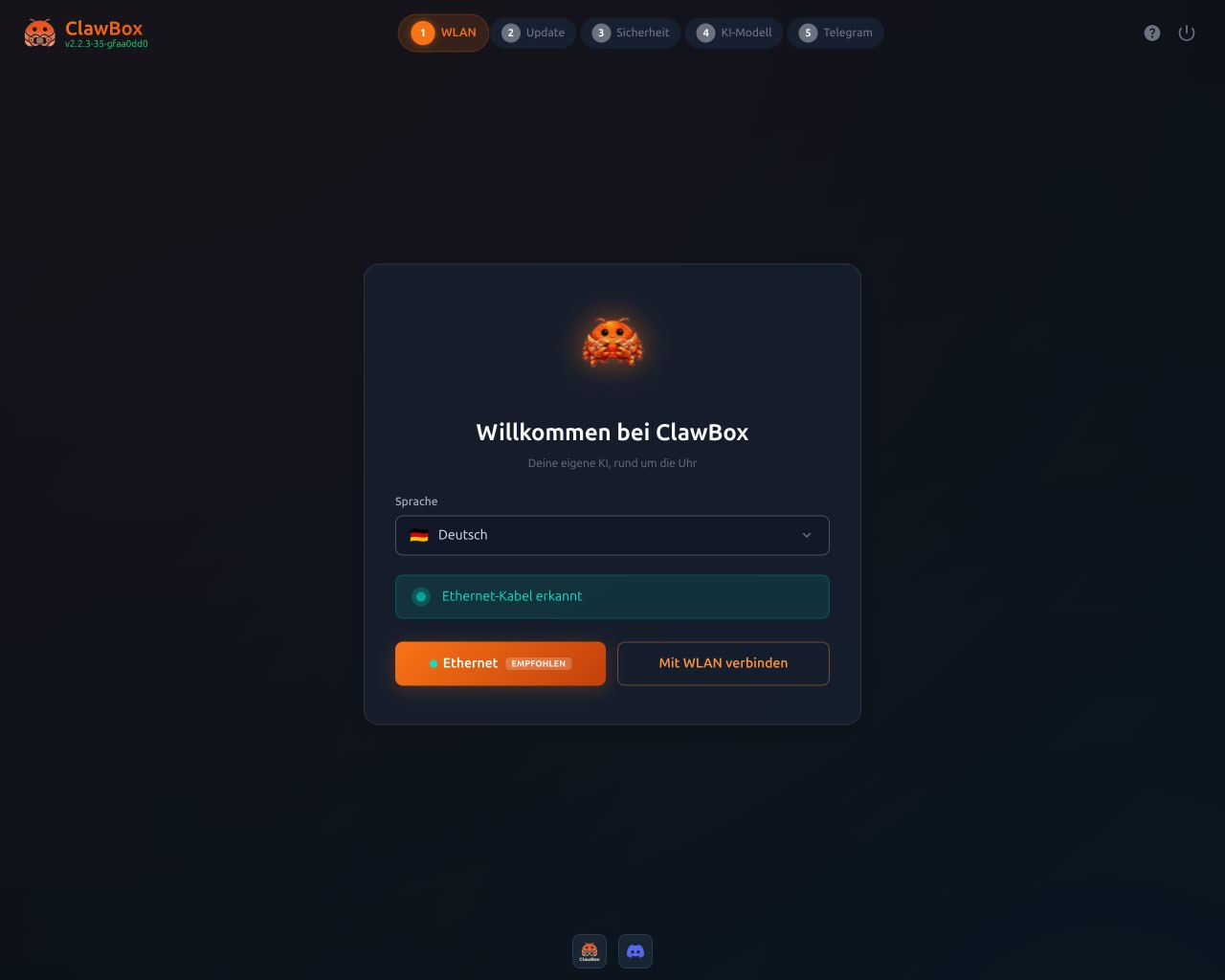
The setup experience just got a major upgrade. The new wizard walks you through five simple steps:
- WLAN/WiFi — Connect to your network (Ethernet auto-detected)
- Update — Pull the latest ClawBox software
- Security — Set your preferences
- AI Model — Choose your AI provider (including ClawAI)
- Telegram — Connect your messaging platform
And it speaks your language. The wizard now supports 10 languages out of the box:
- English, German, French, Spanish, Italian, Dutch, Chinese, Bulgarian, and more
The screenshot above shows the German localization — "Willkommen bei ClawBox" with automatic Ethernet detection. Plug in, pick your language, follow the steps. Five minutes from unboxing to AI.
Real Browser Automation
This was already in ClawBox, but v2.2.3 makes it a first-class feature with its own desktop app. Click the Browser icon on the Web OS desktop and you have a full Chromium instance running on your hardware.
Why does this matter? Because your ClawBox's browser:
- Has a real IP address — not flagged as a data center
- Keeps persistent sessions — stays logged in to your accounts
- Runs on dedicated hardware — no shared resources
- Can't be detected as automation by most anti-bot systems
Your AI agent can log into websites, fill forms, scrape data, manage social media, track prices — anything you'd do manually in a browser. Except it runs 24/7 without you.
Generate Apps With a Single Prompt
This is the feature that changes everything.
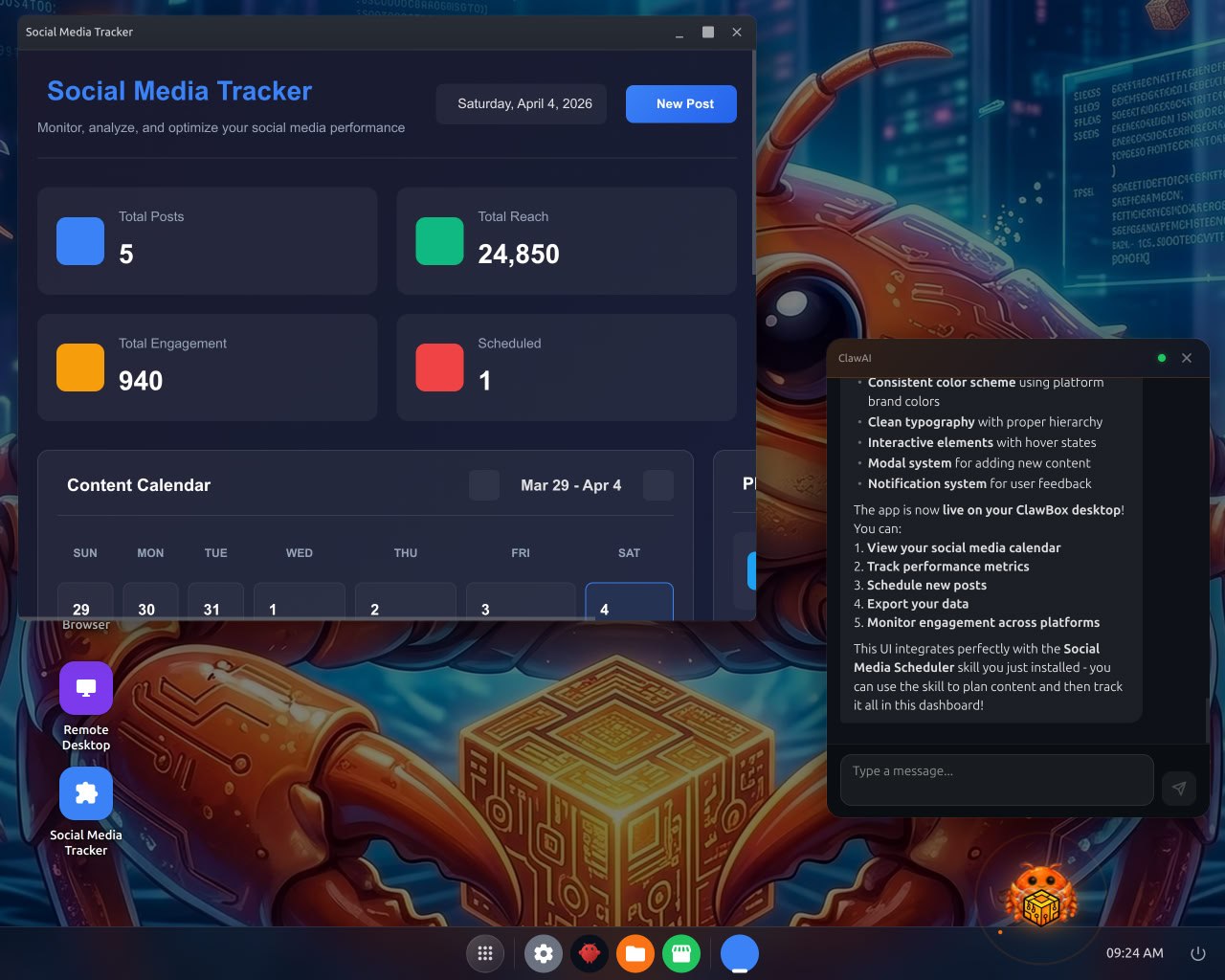
With ClawBox MCP (Model Context Protocol), you don't install apps — you describe what you want, and your AI builds it.
In the screenshot above, someone asked for a Social Media Tracker. The AI:
- Built the entire app — dashboard with analytics, content calendar, engagement metrics
- Created a desktop icon — "Social Media Tracker" appears on the Web OS desktop
- Launched it — the app is live, functional, and ready to use
This works for anything:
- "Build me a CRM for my clients" → full client management app on your desktop
- "I need an inventory tracker" → stock management with charts and alerts
- "Create a project dashboard" → Kanban board with deadlines and assignments
Your ClawBox OS becomes uniquely yours — customised with apps that fit your exact workflow, generated by AI in seconds. No coding. No searching app stores. Just tell your AI what you need.
Under the hood, this uses the Model Context Protocol (MCP) — the emerging open standard for connecting AI to tools and data. As the MCP ecosystem grows, your ClawBox grows with it.
What This Means
ClawBox started as a box that runs AI locally. With v2.2.3, it's becoming a complete AI platform:
| Feature | Before v2.2.3 | After v2.2.3 |
|---|---|---|
| Management | SSH / config files | Full Web OS in browser |
| AI Skills | Manual install | App Store, one-click |
| AI Provider | BYO API key required | ClawAI free tier included |
| Setup | Technical, English only | 5-step wizard, 10 languages |
| Browser | Background service | Desktop app, visual control |
| Custom apps | Not possible | Describe it → AI builds it |
| Extensibility | Custom scripts | MCP protocol, open standard |
When Can I Get It?
v2.2.3 Beta launches in 4 days. If you already own a ClawBox, the update arrives automatically — no action needed.
Don't have a ClawBox yet? Easter sale is still running:
Use code EASTER10 for 10% off — valid until April 7.
→ Get ClawBox at openclawhardware.dev
ClawBox: €549. NVIDIA Jetson Orin Nano 8GB. 512GB NVMe. 67 TOPS. Ships worldwide via DHL Express.